Leave a Comment
1.安装驱动
目前有两个MySQL的驱动,我们可以选择其中一个进行安装:
MySQL-python:是封装了MySQL C驱动的Python驱动;mysql-connector-python:是MySQL官方的纯Python驱动。
MySQL-python:
安装教程:http://www.cnblogs.com/jfl-xx/p/7299221.html
mysql-connector-python:
安装教程:http://www.cnblogs.com/Bgod/p/6995601.html
2.测试连接
这里使用MySQL-python驱动,即MySQLdb模块。
test_connect.py

 #!/usr/bin/python
 # -*- coding: UTF-8 -*-

 import MySQLdb

 # 打开数据库连接
 db = MySQLdb.connect("localhost", "root", "123456", "test")

 # 使用cursor()方法获取操作游标
 cursor = db.cursor()

 # 使用execute方法执行SQL语句
 cursor.execute("SELECT VERSION()")

 # 使用 fetchone() 方法获取一条数据库。
 data = cursor.fetchone()

 print "Database version : %s " % data

 # 关闭数据库连接
 db.close()
测试结果如下,连接成功:

3.创建数据库表
测试成功后,我们可以在python中直接为MySQL创建表:
create_table.py
 #!/usr/bin/python
 # -*- coding: UTF-8 -*-

 import MySQLdb

 # 打开数据库连接
 db = MySQLdb.connect("localhost", "root", "123456", "test")

 # 使用cursor()方法获取操作游标
 cursor = db.cursor()

 # 如果数据表已经存在使用 execute() 方法删除表。
 cursor.execute("DROP TABLE IF EXISTS EMPLOYEE")

 # 创建数据表SQL语句
 sql = """CREATE TABLE EMPLOYEE (
          FIRST_NAME  CHAR(20) NOT NULL,
          LAST_NAME  CHAR(20),
          AGE INT,
          SEX CHAR(1),
          INCOME FLOAT )"""

 cursor.execute(sql)

 # 关闭数据库连接
 db.close()
建表结果 如下:

4.操作数据库表
注意点:MySQL中的占位符为%s
operate_table.js
 #!/usr/bin/python
 # -*- coding: UTF-8 -*-

 import MySQLdb

 # 打开数据库连接
 db = MySQLdb.connect("localhost", "root", "123456", "test")

 # 使用cursor()方法获取操作游标
 cursor = db.cursor()

 # SQL插入语句
 ins_sql = """INSERT INTO EMPLOYEE(FIRST_NAME,
          LAST_NAME, AGE, SEX, INCOME)
          VALUES ('yu', 'jie', 20, 'M', 8000)"""

 ins_sql1 = 'insert into employee(first_name, last_name, age, sex, income) values (%s, %s, %s, %s, %s)'

 # SQL查询语句
 sel_sql = 'select * from employee where first_name = %s'

 # SQL更新语句
 upd_sql = 'update employee set age = %s where sex = %s'
 # SQL删除语句
 del_sql = 'delete from employee where first_name = %s'

 try:
     # 执行sql语句
     # insert
     cursor.execute(ins_sql)
     cursor.execute(ins_sql1, ('xu', 'f', 20, 'M', 8000))
     # select
     cursor.execute(sel_sql, ('yu',))
     values = cursor.fetchall()
     print values
     # update
     cursor.execute(upd_sql, (24, 'M',))
     # delete
     cursor.execute(del_sql, ('xu',))

     # 提交到数据库执行
     db.commit()
 except:
     # 发生错误时回滚
     db.rollback()

 # 关闭数据库连接
 db.close()
执行插入操作
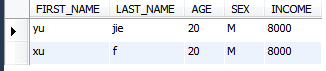
执行查询操作

执行更新操作
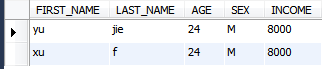
执行删除操作

查询语句的知识点:
Python查询Mysql使用 fetchone() 方法获取单条数据, 使用fetchall() 方法获取多条数据。
fetchone(): 该方法获取下一个查询结果集。结果集是一个对象
fetchall():接收全部的返回结果行.
例如该例子:
 sel_sql = 'select * from employee where first_name = %s'
 cursor.execute(sel_sql, ('yu',))
     results = cursor.fetchall()
     for row in results:
         fname = row[0]
         lname = row[1]
         age = row[2]
         sex = row[3]
         income = row[4]
         print "fname=%s, lname=%s,age=%d,sex=%s,income=%d" % (fname, lname, age, sex, income)
结果如下:
